How to make an FPS game
Build an FPS from a first-person starter, change its waves, then test movement, shooting, win, loss and restart.
Proving Ground: practice · 2 waves · 6 enemies · one HTML file. WASD moves; mouse aims; click fires.
1. Copy the FPS starter
Already installed the kit? Run these commands from the kit folder.
npm run new -- s7-fps --from=starters/fps-three
npm run build -- --game=games/s7-fpsYou copy a working first-person game. The kit’s fps-three starter already connects the camera, movement, weapons, enemies and round flow. Its original Proving Ground has three walkers in the first wave, followed by three walkers and two spitters. Begin there so the first change has a clear before and after.
Install the kit with the commands on your welcome page. In a working copy of the kit, run the commands above from its root. The copy goes into games/s7-fps/, where you edit src/game/. Keep the starter intact. Anthropic’s quickstart covers setting up Claude Code and opening a project folder.
We ran this copy and baseline build on 20 November 2026. The baseline compiled to 2,998,213 bytes and passed the kit’s size check. See the separate browser test of the edited game.
The output is games/s7-fps/dist/index.html. The built game above is the practice version after step 2.
2. Make two shorter waves
You edit the enemy counts in src/game/rules.js. Set the first walker count to 2. In wave two, set the walker count to 2 and leave the spitter count at 2. Keep spawnInterval at 0.8 and 0.7 seconds and breakSeconds at 2. This makes the total six while preserving the encounter’s timing settings.
Change the title in both rules.js and index.html to Proving Ground: practice. Set the tagline to “Clear two waves of six enemies in total.” The title screen now tells the player what finishing means. Ask Claude Code for exactly that edit with this prompt:
Use the fps-three starter to make a small single-player FPS called Proving Ground: practice. Keep its map, movement and weapons. Set wave one to two walkers, then wave two to two walkers and two spitters. Keep the spawn intervals at 0.8 and 0.7 seconds and the break at two seconds. Build the single HTML file, play through both waves, check losing and restarting, and keep the asset credits.3. Keep movement and shooting connected
You test the existing controls before changing weapons. Use WASD, mouse look and click to fire. R reloads, Space jumps, Shift sprints, and 1, 2, 3 or Q swaps weapons. The starter has a hitscan carbine, a projectile weapon and a hatchet, so changing the visible weapon model alone does not change how its attacks work.
The carbine’s definition in src/game/weapons.js has a 30-round magazine and a 2.1-second reload. Keep those values while testing the wave edit. For mouse look, MDN’s Pointer Lock documentation explains the click and iframe restrictions. This starter offers drag controls when lock is unavailable; ?look=drag forces that mode. Test the full-tab link and the embedded version separately.
4. Rebuild and check the rules
You build the changed project. Run the build again after saving. Our practice build completed in 8.661 seconds on this machine. With bundled notices and its indexing tag, the downloadable HTML is 2,999,745 bytes. Build duration measures compilation, not the time to design a game or a Claude usage bill.
We also executed the actual round state machine with supplied enemy eliminations. It spawned eight enemies before the edit and six afterward, reached the win state, reset the queue and kills on restart, and stopped spawning after loss. The measured commands and eight FPS/racing rule checks are available to inspect. Supplied eliminations test round logic; they do not test aiming or enemy movement.
npm run build -- --game=games/s7-fpsIf compilation reports an import or syntax error, fix that error before continuing. Keep the last working HTML alongside the current one so an edit can be compared directly.
5. Play a complete round
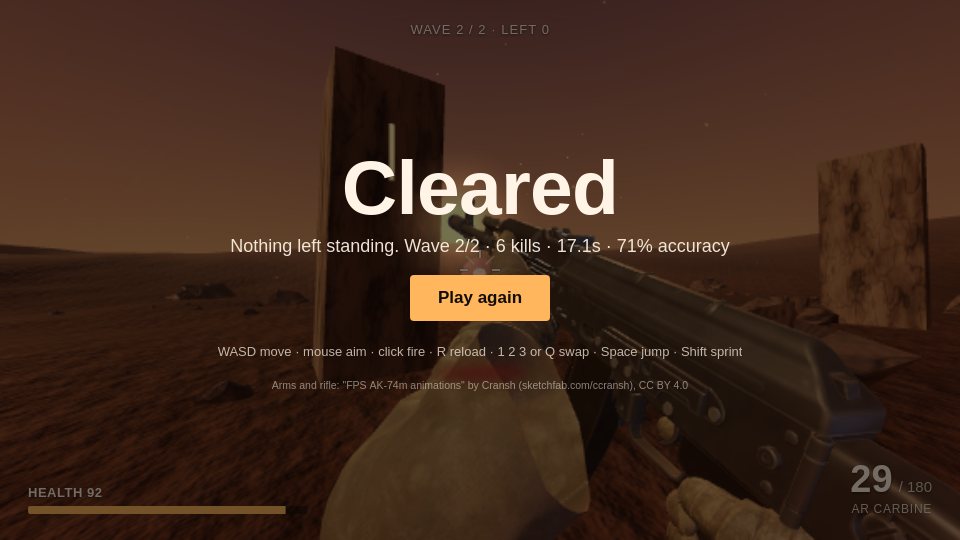
Test the controls and both endings. In WebKit, keyboard and mouse input moved the player, turned the view, fired and reloaded. The scripted player cleared both waves with six kills. Read the exact-build playtest.
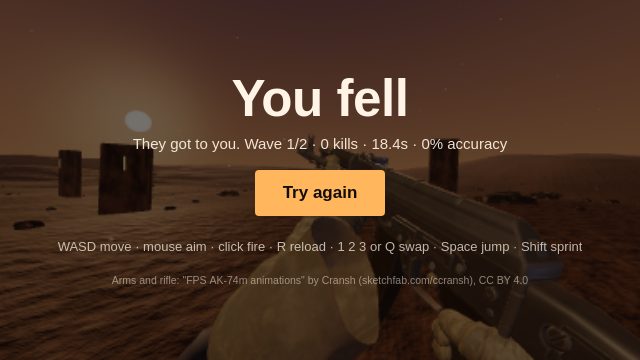
The stock test expects at least eight kills. For this edit, check for six kills and a win. In a second run, we let enemies defeat the player, then clicked to restart at wave one with 100 health and 30 rounds in the carbine. Repeat that check after changing the starter.
npm run playtest -- --game=games/s7-fpsOpen Proving Ground: practice and try the sequence yourself. Keep the bundled notices when sharing the HTML or replacing assets.
6. Give the arena its setting
You change the world after the round works. Use world.js for the level, look.js for lighting and atmosphere, and enemies.js for enemy definitions. Rebuild and repeat the same winning route after each change. The kit is $29 a year; Claude access is separate. For a larger production example, Cold Chain’s initial build recorded 50.6 minutes and $8.54 in metered usage. Those historical numbers describe Cold Chain, not the compilation above.
Questions
How do I make an FPS game?
Start with a first-person camera, movement, a weapon, an enemy and a round that ends. This guide uses the kit's fps-three starter, changes its wave counts, builds a single HTML file and checks the round rules before browser playtesting.
What is the easiest FPS game to make?
A small single-player wave shooter is a manageable first project. Keep one map and a clear finish. The practice example has two waves and six enemies, with movement, weapons and restart supplied by the starter.
Can I make an FPS game without writing all the code?
Yes. Give Claude Code a specific change to a working starter, including how the player wins and what must reset. Read the changed files and play the resulting game. The prompt below limits the first edit to title and wave counts.
How do browser FPS controls work?
The game takes keyboard movement and mouse look, often using pointer lock after a click. This starter also supports drag-to-look and touch controls. Open it in a full tab if the embedding page restricts pointer lock.