
Tripo AI alternatives
Use Meshy for custom 3D models or Claude Game Studio to build a playable browser game.
Prices checked 20 November 2026. Tripo’s displayed monthly figure requires annual billing.
| What | Tripo Pro | Meshy Pro | Claude Game Studio |
|---|---|---|---|
| Paid price | Tripo ProUS$240/year, shown as US$20/month | Meshy ProSee the current regional price | Claude Game Studio$29 a year, plus Claude access |
| What it makes | Tripo Pro3D models from text or images, with mesh editing and texturing | Meshy Pro3D models from text or images, with texturing and animation tools | Claude Game StudioBrowser games from genre starters, game-building skills and asset packs |
| Next step | Tripo ProExport the model into your game or 3D application | Meshy ProExport the model into your game or 3D application | Claude Game StudioBuild and play the game, then change its rules and art in your folder |
Choose a model generator
Tripo’s text-to-3D workflow goes from a description through optional refinement to export. Its Pro plan lists batch exports, retopology, private models and commercial use. Choose it when you already know which object your scene needs: a low-poly delivery van, for example, with a clear silhouette and the right dimensions for your road.
Meshy’s text-to-3D workflow also produces textured models and lists GLB, FBX, STL and 3MF exports. Compare a specific object in the format your engine uses. Keep the reference image, generation settings and exported file together so you can reproduce the version you approved. A good still render is only one part of the choice.
Read the annual charge
Tripo’s checked USD view lists 3,000 credits per month for Pro. Credits are the allowance for operations inside Tripo; they are not a promise that every finished asset costs the same amount. Choose the quality and editing operations you need before estimating how many usable props a month’s allowance will cover.
The kit’s annual price pays for its starters, skills and asset library. Claude access is separate. Those purchases solve different parts of a project: a model subscription pays for generating art, while the kit supplies running game code and the workflow for changing it. Price the combination you will actually use rather than comparing the two headline numbers as equivalent services.
Import a model into a playable scene
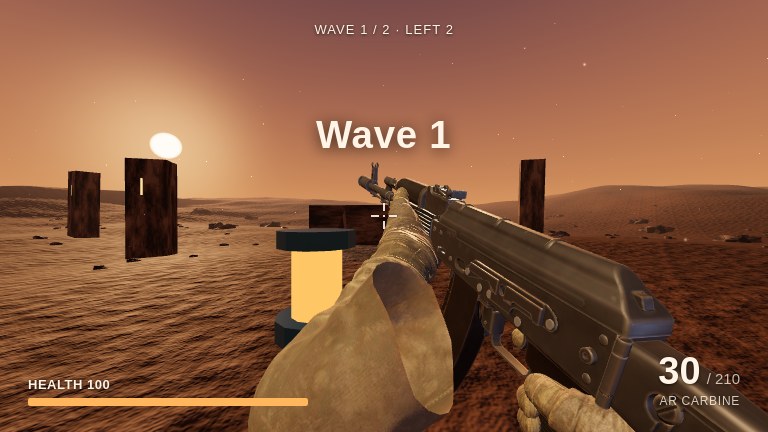
Play the beacon build. We imported an original Blender model beside the spawn and scaled it by 2.5 so it stands out at eye level. Press W to pass it. It marks the route. The arena’s solid cover uses a separate collision setup.
The import change shows where the file goes and how the scene sets its position and scale. The browser test records the player moving past the beacon’s position. Use the FPS guide to build the base game.
Questions
What is an alternative to Tripo AI?
Meshy is an alternative for generating a custom 3D model from text or an image. Claude Game Studio fits a different task: building a playable browser game with movement, weapons, enemies and a finish, then adding models to it.
How much does Tripo AI Pro cost?
On 20 November 2026, Tripo's USD pricing page displayed Pro as $20 per month billed annually, with a total annual charge of $240. That view includes 3,000 monthly credits. Check the billing selector before purchasing.
Does a Tripo model become a game?
A model supplies an object or character. The game still needs input, camera, collision and rules. Import the model into a running scene, set its size and position, then connect it to the appropriate collision or character behavior.
Can I use Tripo models commercially?
Tripo's Pro plan lists private models and commercial use. Keep the terms that apply to the plan and generation date with the downloaded asset, and check any separate rights in your input image.
Compare Meshy alternatives · Compare game makers · Get the kit