Blender MCP: set it up with Claude
Blender MCP connects Claude to Blender through a local tool server and an addon in the running application.
- Install uv and open Blender.
- Download the pinned addon.py, then install and enable it in Blender Preferences → Add-ons.
- In the 3D Viewport, press N, open MCP for Blender and click Connect to MCP server. Look for Connected on followed by the host and port.
- In your game folder, add the server to Claude Code:
claude mcp add --transport stdio blender -- uvx --from mcp-for-blender==2.3.1 mcp-for-blenderOpen /mcp in Claude Code and check that Blender is connected. Ask Claude to call execute_blender_code with print(bpy.app.version_string). The run below used Blender 4.5.3 LTS and server 2.3.1 on 18 November 2026.
Check both ends of the connection
There are two running pieces. Claude Code starts the Python MCP server over stdio. That server connects to the addon inside Blender using a local socket. Keep the application open while you work. A connected MCP client can discover tools even when the Blender side is unavailable, so start with a read-only request that actually reaches the application.
Ask the tool to print bpy.app.version_string and list the current objects. Our returned version was 4.5.3 LTS
. Then make one small change and inspect it in Blender before building the entire prop. If the connection fails, compare the host and port at both ends and confirm the addon is enabled in the Blender version you opened.
The server source at our tested revision describes this as a community integration, separate from the Blender Foundation. The Python package is now named mcp-for-blender; older instructions may use blender-mcp. Keep server and addon revisions together when reproducing a setup.
Our isolated test loaded that exact addon into a fresh Blender session and connected the pinned server using an MCP client. It created the model through execute_blender_code. The addon listened on loopback port 19876 so the experiment did not share another session's connection. A normal installation uses the addon's displayed port.
On Linux without a desktop, a virtual display can run the actual GUI application. The addon's background-mode message explains the distinction: commands would never execute
. Running Blender with --background is useful for offline rendering, but this addon uses a main-thread GUI timer to drain its command queue. Use the application for MCP interaction, then use background rendering separately if needed.
Review scripts before running them against a valuable scene. Save a copy first. For this small example, all geometry is original, external asset services are disabled and telemetry is disabled for the test process. You can follow the whole exercise without a paid asset-generation service.
Make one prop for a specific game
The courtyard needs three readable pickups. A foot, a glowing lens and a roof make the pickup distinct from the player and walls. Here is the build request; the downloadable Python file contains the exact operations that produced the measured exports.
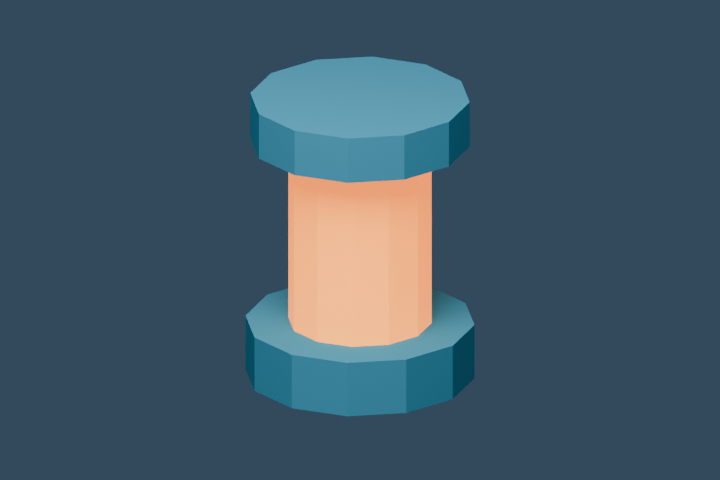
Create an original 0.62-metre beacon: a blue foot and roof with an amber emissive cylinder between them. Use three meshes, no image textures, and 12 sides per cylinder. Export only those selected meshes as beacon-12.glb with Y up. Print triangle count and file size, then use that file for all three pickups in the courtyard game.The source creates three cylinders per variant. The foot has radius 0.24 metres and depth 0.12; the lens has radius 0.15 and depth 0.40; the roof has radius 0.23 and depth 0.10. Their positions put the base on the ground and the top at 0.62 metres. The model's widest part is 0.48 metres across.
One blue material covers the foot and roof; one amber emissive material covers the lens. There are no image textures, downloaded models or hidden texture-file dependencies. The models and generating script are dedicated to CC0, so you can modify them for a commercial game.
Keep game behavior outside the model. Picking up the beacon still uses the courtyard's original distance check. The GLB changes what the pickup looks like. That separation lets you compare geometry variants without also changing movement, goal positions or collision.
Compare the actual exported files
17.1 ms median · 17.3 ms at the 95th percentile
17.1 ms median · 17.5 ms at the 95th percentile
17.1 ms median · 17.4 ms at the 95th percentile
Increasing the cylinder segmentation changes the silhouette and exported geometry. Six sides produce 60 triangles and 6,644 bytes. Twelve sides produce 132 triangles and 10,252 bytes. Twenty-four sides produce 276 triangles and 17,472 bytes. These counts were checked again against the GLB's own index accessors after export.
Start with the middle file, then compare it at the distance the player will actually see it. The highest-detail file contains more triangles, but the difference may be hard to see for a small pickup. Use the game's mesh selector to compare the same object in the same scene. File size alone does not predict frame rate.
Blender's glTF export documentation is the reference for export options. In this run, selected objects were exported as a single GLB with Y up. After importing into a different renderer, inspect scale, orientation and material appearance before making copies throughout a level.
Use that GLB in the courtyard
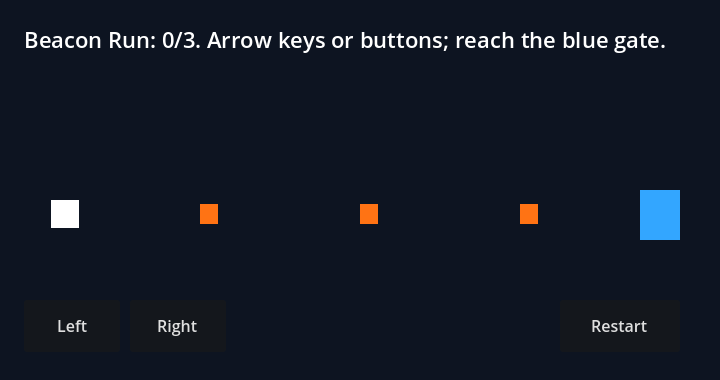
This game loads the exported beacon files directly. Collect three beacons, then return to the blue gate. Change the mesh selector to compare all three exports while the game rules stay the same.
1. Create in Blender
The MCP tool executes the model script inside the open application.
2. Export selected meshes
The GLB carries three meshes and their materials in one file.
3. Load into Three.js
GLTFLoader reads the file; each pickup clones the loaded scene.
4. Keep the existing rules
Collection, walls, timer and restart use the same courtyard logic.
Unzip the complete folder and serve it with python3 -m http.server 8000, then open /learn/beacon-courtyard.html. The HTML needs the adjacent downloads folder and the pinned Three.js 0.170.0 library from jsDelivr. The 3D guide explains its camera and collision boxes; the studio kit adds larger asset packs and game starters.
Repair a missing-object request
We intentionally asked Blender for the dimensions of an object that did not exist:
bpy.data.objects['Beacon_missing'].dimensionsThe returned error was a KeyError because that object did not exist. The MCP connection was functioning: Blender had received and executed the request. Reinstalling the server would have left the object name unchanged.
List the real object names, then use the exact name from that output. Our post-export inspection returned names including Beacon_12_Foot, Beacon_12_Lens and Beacon_12_Roof. Ask for one of those objects' dimensions and confirm the result before issuing a larger edit.
The measurement download carries the tested versions, operation durations, error and export hashes. The create-and-export operation completed in 0.492 seconds after installation and connection. That measurement starts once the MCP connection is ready. Downloading Blender, installing dependencies and composing the model happen before that interval.
For your own asset, repeat the complete transfer after each substantial change: save, export, load, inspect and play the pickup interaction. Keep one known working GLB beside the new version so a material or axis change can be compared in the same destination.
Questions
What is Blender MCP?
Blender MCP is a third-party bridge that lets an MCP client call tools inside Blender. This guide uses ahujasid's mcp-for-blender project: a Python MCP server connects to an addon in the running Blender application. It is separate from the Blender Foundation.
How do I connect Blender MCP to Claude Code?
Install uv, install and enable the matching addon in Blender, then add the local stdio server with claude mcp add. Open Blender and check the server in Claude Code's /mcp view. Ask for the Blender version and scene contents before asking it to modify a model.
Can Blender MCP make assets for a game?
Yes. Our actual tool run created a three-part beacon and exported three GLB variants: 60, 132 and 276 triangles. This page includes those files, the generating script and a browser courtyard that loads the exported model as its pickups.
Why does Blender MCP connect but not execute commands?
Check that the addon is running in the Blender application and that the server and addon use the same host and port. This pinned addon explicitly declines to start in Blender background mode because its command queue uses the application's main-thread timer. On a Linux server, use a virtual display with the GUI application.