How to make a game in Godot
To make a game in Godot, build a scene out of nodes, attach a GDScript to it and run the project. With Godot MCP, Claude Code builds the scene through tool calls and reads the engine's output. This guide makes Pondlight, a firefly that gathers dew drops, in 2.3 minutes.
- 2.3 min
- from the sentence to a passing run
- 1%
- of a Claude Max week (estimate)
- 14 calls
- of Godot MCP built the scene in 4.9 seconds
- 4.5.1
- Godot version, one scene and one script
Based on one Cold Chain session on Claude Max 20x (16 Nov 2026) that included other work.
1. Build the scene tree with tool calls
You give Claude Code one sentence and the connected Godot tools. It created main.tscn with a Node2D root, then added the nodes below with add_node, each call naming a parent. The set-up follows our Godot MCP guide and Anthropic's MCP instructions cover registering a local server in Claude Code.
A node is Godot's unit: a scene is a tree of them, and every game object is one. The official first 2D game tutorial builds Dodge the Creeps from three scenes and assumes programming experience. Pondlight keeps one scene so you can read the whole tree on one screen.
Make a small Godot 4 game where a firefly gathers dew drops on a night pond while two heron shadows drift across it, built through Godot MCP.| Node | Type | What it does |
|---|---|---|
| root | Node2D | Holds the script. Draws the glow and the lily pads. |
| Pond | ColorRect | The water. Pushed behind the root's drawing with z_index -1. |
| Drops | Node2D | A group node for the six drops. |
| Drop1 to Drop6 | ColorRect | Six 12 by 12 squares the firefly gathers. |
| Player | ColorRect | The firefly, 14 by 14. |
| ShadowA, ShadowB | ColorRect | Two heron shadows that bounce off the pond's edges. |
| Hud | Label | Drops and lamps. Its text was set in the add_node call. |
{ "tool": "add_node", "projectPath": "…/pondlight", "scenePath": "main.tscn",
  "nodeType": "Label", "nodeName": "Hud", "parentNodePath": "root",
  "properties": { "text": "Drops 0/6    Lamps 3" } }
2. Read the script Claude wrote
You attach one GDScript to the root and let it own the rules. main.gd is 159 lines. It sets each node's size and color in _ready(), moves the firefly 230 pixels a second inside a rectangle called FIELD, bounces the two shadows off the edges and checks overlaps with Rect2.intersects. Three hits end the round, and gathering all six drops wins it.
The script is plain GDScript with typed variables. The scene file only needed an ext_resource line and a script = ExtResource("1") line, which Claude wrote with an ordinary file edit because the pinned server has no tool for attaching a script. Here are the constants and the two functions that run every frame.
const SPEED := 230.0
const FIELD := Rect2(Vector2(20, 20), Vector2(680, 340))
const PADS := [Vector2(150, 160), Vector2(420, 220), Vector2(570, 70), Vector2(300, 330), Vector2(40, 60)]
const DROP_SPOTS := [Vector2(110, 90), Vector2(330, 60), Vector2(610, 110), Vector2(520, 270), Vector2(250, 300), Vector2(90, 250)]
func _physics_process(delta: float) -> void:
if finished:
return
clock += delta
var dir := _autoplay_direction() if autotest else _keys_direction()
player.position = (player.position + dir.limit_length(1.0) * SPEED * delta).clamp(FIELD.position, FIELD.end - player.size)
for s in shadows:
s.position += shadow_vel[s] * delta
if s.position.x < FIELD.position.x or s.position.x + s.size.x > FIELD.end.x:
shadow_vel[s].x *= -1.0
if s.position.y < FIELD.position.y or s.position.y + s.size.y > FIELD.end.y:
shadow_vel[s].y *= -1.0
_check_drops()
_check_hits()
queue_redraw()
func _check_drops() -> void:
var me := Rect2(player.position, player.size)
for d in drops:
if d.visible and me.intersects(Rect2(d.position, d.size)):
d.visible = false
gathered += 1
print("POND_DROP n=%d t=%.2f" % [gathered, clock])
_update_hud()
if gathered == drops.size():
finished = true
hud.text = "The pond is lit. %d of %d lamps left." % [lives, 3]
print("POND_WIN t=%.2f lives=%d" % [clock, lives])3. Run it through the server and read the output
You call run_project, wait, then call get_debug_output. The script prints one line for each event, so the server returns a play-by-play. In this run the scripted player gathered all six drops and won at 5.55 seconds of game time with all three lamps left, and the engine reported no script errors.
The output also carried a V-Sync warning and ALSA audio errors. They come from running Godot on a Linux server with a virtual display and no sound card, and they do not touch the game. Call stop_project afterwards, and keep the game open until you have read the output, because a project that has exited returns No active Godot process
.
POND_READY drops=6 lives=3
POND_DROP n=1 t=0.53
POND_DROP n=2 t=1.45
POND_DROP n=3 t=2.12
POND_DROP n=4 t=2.98
POND_DROP n=5 t=4.23
POND_DROP n=6 t=5.55
POND_WIN t=5.55 lives=3
Read the full debug output as the server returned it, the run record, with the timing of each call, or the receipts file.
4. See what broke in the recording
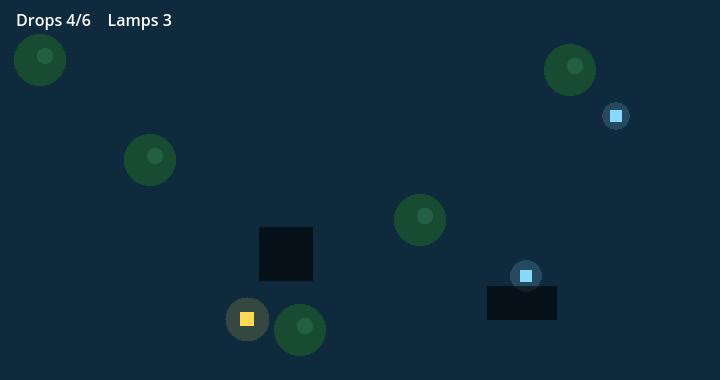
You record a run and look at a frame. The first run printed the right events, but the first recording showed flat squares with no glow. The script draws the halos in the root's _draw(), and Godot paints a parent's drawing under its child nodes, so the Pond rectangle covered them. One line, $Pond.z_index = -1, put the water behind the root's drawing.
The scripted player never touches the keyboard, so a second check pressed the right arrow through Godot's input state for half a second. The firefly moved 115.0 pixels, which matches 230 pixels a second. A run that wins on its own does not prove the keys work, and this check does.
| Moment | UTC, 24 November 2026 | Minutes |
|---|---|---|
| Sentence given to Claude Code | 17:23:47 | 0.0 |
| First build opened | 17:24:40 | 0.9 |
| Repair noted | 17:25:39 | 1.9 |
| Playtest passing, captures read | 17:26:03 | 2.3 |
5. Open it in the editor and play it
You download the project and import it. Download Pondlight, unzip it, open Godot 4.5, choose Import and select project.godot, then press F5. Move with the arrow keys or WASD, gather the six blue drops and keep clear of the dark shadows. The files are CC0, so you can change them however you like.
To see what Claude wrote at each step, open main.gd or main.tscn. For a game that uses sprites, physics bodies and collision shapes, follow the Godot tutorial linked above, then ask Claude Code to make the same changes through the server. For a browser game with no engine to install, the browser game guide starts from one HTML file.
Questions
How do I make a game in Godot?
Create a project, build a scene of nodes, attach a GDScript to a node and run the project. Godot's own first tutorial builds a 2D game called Dodge the Creeps from separate Player, Mob and HUD scenes and assumes some programming experience. This guide builds a one-scene game, Pondlight, with Claude Code and Godot MCP.
Can Claude Code make a Godot game?
Yes, through a Godot MCP server. The pinned server in this guide created the scene and its 12 nodes with tool calls in 4.9 seconds, ran the project on Godot 4.5.1 and returned the engine's output. The script was ordinary file editing, and the scene file got one line to attach it.
What is Godot MCP?
Godot MCP is a server that lets an AI client such as Claude Code call Godot tools: get the version, create a scene, add a node, run a project, read debug output and stop it. Servers differ in what they expose, so check the tool list before you start. The setup guide on this site covers the install.
How long does it take to make a game in Godot with Claude Code?
Pondlight took 2.3 minutes from the sentence to a passing run, recording and keyboard check, on 24 November 2026, including one repair. The requests in that window used an estimated 1% of a Claude Max week. It is one scene with colored rectangles and one script, so a larger game takes longer.
Which Godot version does this use?
Godot 4.5.1 stable, with the Godot MCP server at revision 1209744. The project uses the Compatibility renderer, so it also runs on machines without a modern graphics card. It ran here on a Linux server under a virtual display with software rendering.