
Claude Code plugins for game development
Claude Code plugins package skills and tools; choose a browser-game kit, Godot MCP, Blender MCP or Unity integration for the project you want to build.
| Your task | Extension | What it changes |
|---|---|---|
| Build a browser game | Extension:Claude Game Studio | What it changes:Game code, starter scenes and assets in your project |
| Build and run a Godot scene | Extension:Coding-Solo Godot MCP | What it changes:Scene nodes, project launch and engine output |
| Make a 3D game prop | Extension:Blender MCP | What it changes:Blender objects and exported models |
| Work in a Unity project | Extension:Official Unity plugin / Unity MCP | What it changes:Unity guidance / editor operations, depending on connection |
Install a Claude Code plugin
Anthropic's plugin overview defines the package, and its installation guide covers marketplaces, scope and reloading. Both were read on 25 November 2026. In an interactive session, /plugin opens the manager. Choose Discover, inspect the plugin's components and select the scope. Use a project scope when this is a project dependency; local scope keeps a choice specific to your checkout.
For a concrete vendor example, Unity documents these two commands inside Claude Code. They add Unity's marketplace and select its plugin. After installation, type /unity: and look for its skill commands. The commands below are the vendor's published install, not a claim that this page ran a fresh Unity setup.
/plugin marketplace add Unity-Technologies/unity-agent-plugin
/plugin install unity@unity-agent-pluginRun those slash commands inside Claude Code. From an ordinary shell, use claude plugin marketplace add and claude plugin install instead. The official Unity instructions describe both. A shell install loads in the next session or after /reload-plugins.
For Claude Game Studio, the welcome page after checkout supplies your two install commands and licence key. See the kit contents and price, then use those exact commands. They belong to your purchase and should stay in your own project setup.
A recorded plugin installation
On 13 November 2026 the packaged kit was installed into an empty project with Claude Code 2.1.323. The rehearsal added the marketplace from its local package folder at local scope. Claude Code reported a successful installation, and its plugin list showed version 1.0.0 enabled. A fresh session then loaded the plugin's 10 skills and 2 agents and ran its status command. The installation record keeps the returned results with machine paths and licence values removed.
These are the command forms used in that rehearsal. Replace the bracketed values with the package location and your own key. The installation check used local checkout services; for a purchased copy, use the exact commands supplied by your welcome page.
claude plugin marketplace add <path-to-marketplace> --scope local
claude plugin install gamestudio@gamestudio --scope local --config licence_key=<your key>Successfully installed plugin: gamestudio@gamestudio (scope: local)
Plugin: gamestudio@gamestudio
Version: 1.0.0
Scope: local
Status: enabled
Fresh session: 10 skills, 2 agentsFor a smaller first extension, the design-game walkthrough installs one standalone SKILL.md and compares two real lantern-delivery games built from the same brief. A single skill teaches a repeatable design step. A plugin distributes several components together. An MCP connection lets those instructions call a running application's tools.
Godot MCP builds scene nodes
Coding-Solo's Godot MCP supplies scene creation, node addition, project launch and debug-output tools. Our Godot MCP setup pins the tested server revision and shows the complete build instructions. After building that server and installing Godot, register its JavaScript entry point with your own absolute paths:
claude mcp add --transport stdio godot -e GODOT_PATH="/absolute/path/to/godot" -- node /absolute/path/to/godot-mcp/build/index.jsAsk for the Godot version first, then create one scene. Pondlight used 14 build calls to create a Node2D scene and its nodes. The script was ordinary GDScript file editing. The game runs on Godot 4.5.1; its saved measurements name the calls and timings.
| Node | Type | What it does |
|---|---|---|
| root | Node2D | Holds the script. Draws the glow and the lily pads. |
| Pond | ColorRect | The water. Pushed behind the root's drawing with z_index -1. |
| Drops | Node2D | A group node for the six drops. |
| Drop1 to Drop6 | ColorRect | Six 12 by 12 squares the firefly gathers. |
| Player | ColorRect | The firefly, 14 by 14. |
| ShadowA, ShadowB | ColorRect | Two heron shadows that bounce off the pond's edges. |
| Hud | Label | Drops and lamps. Its text was set in the add_node call. |
- 2.3 min
- Pondlight: sentence to final play check
- 14
- MCP calls to build its scene
- 6 drops
- collected in the recorded win
- 115 px
- moved in the half-second keyboard check
The recording caught a visual repair: the pond rectangle covered the firefly's glow. Moving it behind the root drawing with $Pond.z_index = -1 revealed the halos. Follow the scene, script and repair, or download Pondlight there and press F5 in Godot.
Blender and Unity connect different tools
Blender MCP connects an AI client to Blender through an add-on and a server process. Use it for geometry, materials and exporting a model. Our Blender walkthrough made a beacon, exported its GLB and put it into a running browser scene. A model exporter fits that task better than asking a scene editor to become a modeling application.
Unity's official Claude Code plugin supplies Unity-specific skills. Coplay's Unity MCP is a separate option for operations inside the editor. Check the actual installed tool list before assuming a skill package controls an open scene. Start with a version request or a scene query, then make a small change and read the editor output.
A game made with the kit
Burning Thatch began with “make me a AAA-looking FPS: samurai in a burning village”. The kit supplied a first-person starter, then the build turned the central action into sword fighting. Its initial build took 65.3 minutes and an estimated 5% of a Claude Max week. The playable version below includes later refinements. The build measurements and original design preserve the inputs.
Based on one Cold Chain session on Claude Max 20x (16 Nov 2026) that included other work. The full game-building guide shows the sword-grip and lighting repairs. Choose the kit for its ten browser starters, assets and game-making steps; choose an engine connection when the project you want to maintain is a Godot or Unity project.
Play Burning Thatch
Open game ↗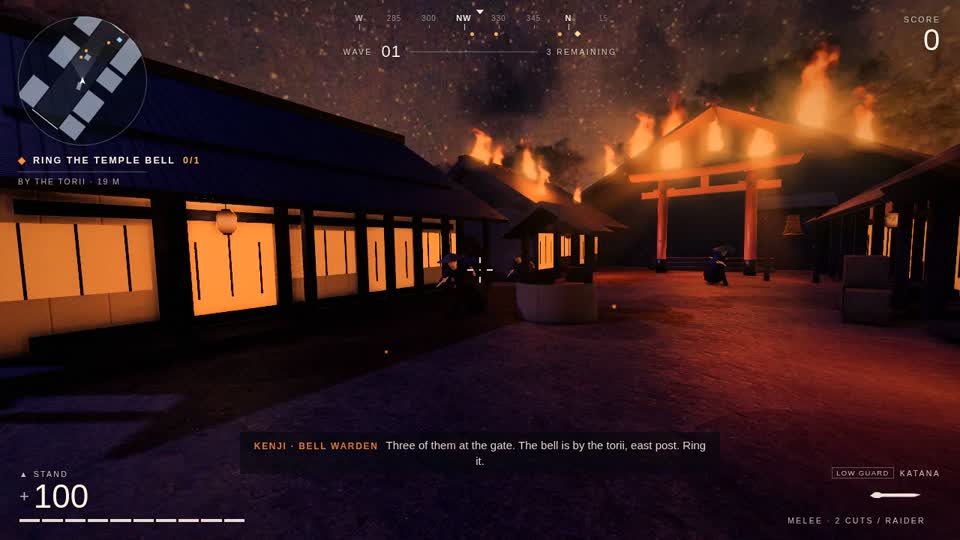
Loading Burning Thatch…
WASD + mouse, or touch: move left, look right, tap to cut.
Questions
What is a Claude Code plugin?
A Claude Code plugin is an installable directory that groups components such as skills, agents, hooks and MCP server configuration. A marketplace lists where plugins come from. Installing a plugin makes its included components available to Claude Code; it does not install a game engine unless that plugin explicitly supplies one.
How do I install Claude Code plugins?
In an interactive Claude Code session, open /plugin and choose a plugin from Discover. For a third-party marketplace, add its documented source first, then install plugin-name@marketplace-name. Shell commands start with claude plugin; slash commands run inside Claude Code. Reload plugins or start another session after a shell install.
Is a plugin the same as an MCP server?
No. A plugin packages extensions. An MCP server is a process or service that exposes callable tools. A plugin can include an MCP configuration, while a server can also be registered independently with claude mcp add. A text skill can explain how to build a scene; an engine-control server can actually run it.
Which Claude Code plugins work with Godot and Unity?
For Godot, Coding-Solo's MCP server exposes scene, node and project-running tools. Unity has an official Claude Code plugin with game-development skills, and community options such as Coplay's Unity MCP for editor operations. Choose by the tools your installed version exposes and verify the connection in the intended project.
What does the browser-game kit add?
Claude Game Studio supplies ten browser-game starters, game-making skills and an asset library. Its builds run in your own project. Burning Thatch, shown here, began from a first-person starter; the Godot and Blender connections serve different jobs and can be used alongside a browser workflow.